safe_padded_read
tiatoolbox.utils.image.safe_padded_read
- safe_padded_read(image, bounds, stride=1, padding=0, pad_mode='constant', pad_constant_values=0, pad_kwargs=None)[source]
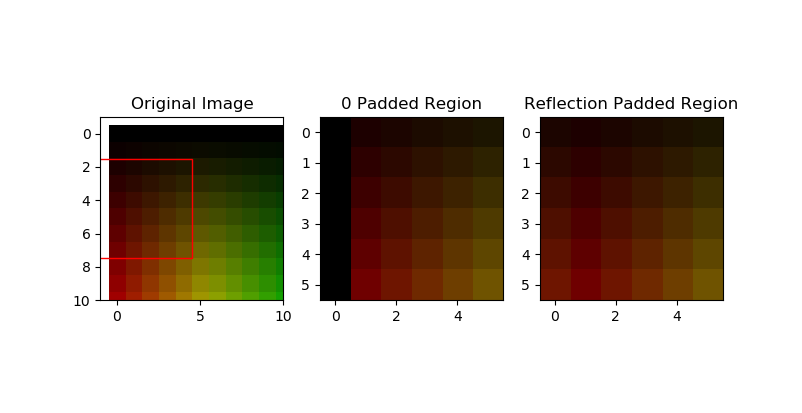
Read a region of a numpy array with padding applied to edges.
Safely ‘read’ regions, even outside of the image bounds. Accepts integer bounds only.
Regions outside of the source image are padded using any of the pad modes available in
numpy.pad().Note that padding of the output is not guarenteed to be integer/pixel aligned if using a stride != 1.
- Parameters
image (
numpy.ndarrayorglymur.Jp2k) – Input image to read from.bounds (tuple(int)) – Bounds of the region in (left, top, right, bottom) format.
stride (int or tuple(int)) – Stride when reading from img. Defaults to 1. A tuple is interpreted as stride in x and y (axis 1 and 0 respectively). Also applies to padding.
padding (int or tuple(int)) – Padding to apply to each bound. Default to 0.
pad_mode (str) – Method for padding when reading areas outside of the input image. Default is constant (0 padding). Possible values are: constant, reflect, wrap, symmetric. See
numpy.pad()for more.pad_constant_values (int, tuple(int)) – Constant values to use when padding with constant pad mode. Passed to the
numpy.pad()constant_values argument. Default is 0.pad_kwargs (dict) – Arbitrary keyword arguments passed through to the padding function
numpy.pad().
- Returns
Padded image region.
- Return type
- Raises
ValueError – Bounds must be integers.
ValueError – Padding can’t be negative.
Examples
>>> bounds = (-5, -5, 5, 5)
>>> safe_padded_read(img, bounds)
>>> bounds = (-5, -5, 5, 5)
>>> safe_padded_read(img, bounds, pad_mode="reflect")
>>> bounds = (1, 1, 6, 6)
>>> safe_padded_read(img, bounds, padding=2, pad_mode="reflect")